
Ever wanted to create a fictional character who actually acts the way you imagined? Maybe a sarcastic roommate, a sweet romantic partner, or someone straight out of a fantasy novel. Nectar gives you the tools to build that character and start your own story. We looked into its chat models, character settings, media tools, and real user feedback to see where it stands. The creative freedom is a big plus, although the credit system and a few other limits deserve a closer look.
Quick Verdict: Our Nectar AI Rating
Nectar is a good pick for adults who like making their own AI characters and trying different roleplay stories. We particularly like its character builder, choice of chat models, and ready-made Fantasies. You also get image generation, video tools, and voice features, which add more ways to enjoy your characters. The downside? Better models and certain media tools use extra credits, while memory can struggle during long conversations. We’d recommend Nectar for creative roleplay rather than someone who wants a completely free, unlimited companion.

Nectar AI Starting Price
Free / Premium from $4.99 per month with annual billing

Nectar AI Character Creation
Yes, realistic and anime characters

Nectar AI Voice Chat
Yes, voice messages and calls on supported plans

Nectar AI NSFW Content
Available for adults 18+

Nectar AI Platforms
Web, Mobile Web, PWA

Nectar AI Welcome Offer
Limited free messages, image generations, and one custom companion
What Is Nectar? A Different Kind of AI Playground
Nectar is a platform where you create fictional AI companions and interact with them through conversations, images, and stories. It isn’t a dating service, and you’re not speaking to real people behind the character profiles.
The project began with image generation in 2023. It added roleplay features later that year and launched its main AI companion product in early 2024.
Today, Nectar offers several ways to create your own experience. You can chat with a character, write a fictional story, or build an entire scene with several AI companions.
Its biggest selling point is freedom of choice. You don’t have to stick with the personality that comes with a ready-made character. You can change how your companion speaks, acts, and relates to you. The platform also lets you choose different AI models for different types of conversations.
The Fantasies feature is another interesting part of the service. Instead of starting with an empty chat, you enter a prepared situation with a setting, characters, and a role to play. For example, you could take part in a mystery at an old hotel or meet a stranger during a fictional trip. That’s where we think Nectar has the most appeal. It gives you tools to build a scene rather than simply asking an AI companion how its day went.
Best Nectar AI Alternatives

The hottest AI girlfriend you've ever seen. Design every detail — face, body, style — and watch her come to life in photos, voice notes, and video. Eye candy that talks back.


First Steps: Nectar Login, Characters, and Your Opening Message
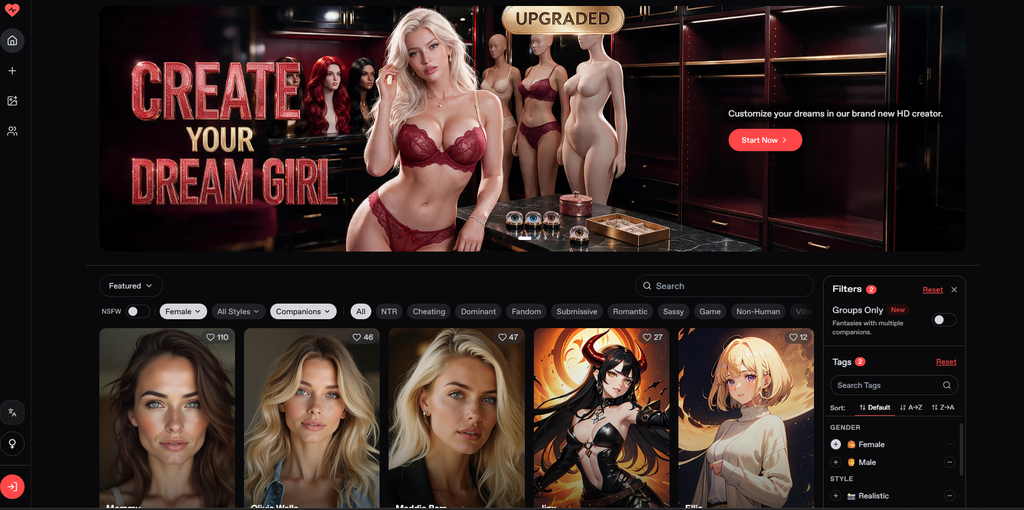
The first thing you’ll notice on Nectar AI is the focus on characters. Portraits, categories, and story ideas take up much of the website.
Getting started involves four steps.
1. Open Nectar and Choose Your Preferences
The welcome screen asks you to confirm your age. You can then browse the Discover section to find realistic characters, anime companions, and prepared scenarios.
The filters help narrow the selection by gender, style, and other details. It’s useful when you want a particular type of character but don’t feel like building one yet.
2. Register Your Account
Select a character and click Start Chat. Nectar will ask you to register or sign in through one of its available methods, such as email or Google.
The Nectar login process doesn’t require a long personality quiz. You can get to the main tools without describing your entire life first.
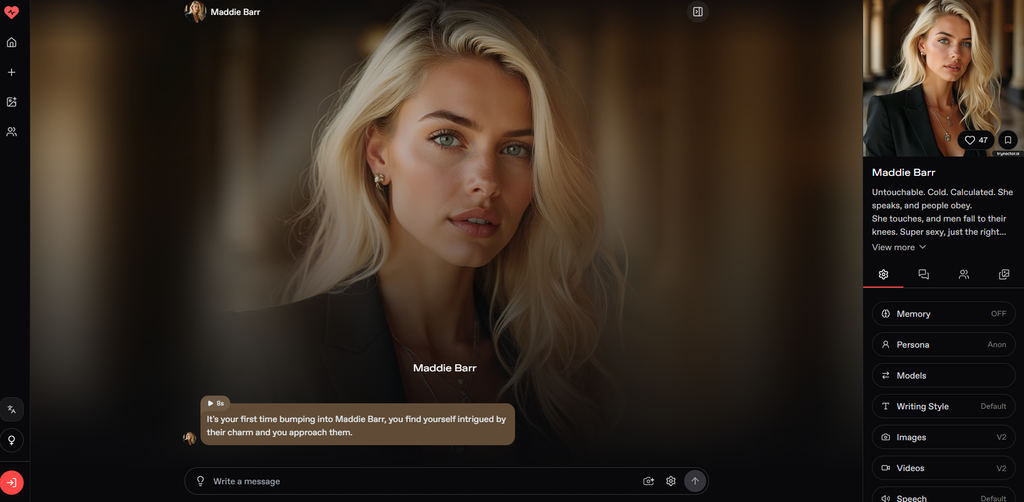
3. Pick a Ready-Made Character
The easiest starting point is an existing profile. Each character has an image, personality details, and an opening message.
We’d begin with a simple fictional situation. A character waiting at a café or preparing for a road trip gives you something clear to respond to.
You can also use the chat controls to change the reply length, select an AI model, or ask for another response.
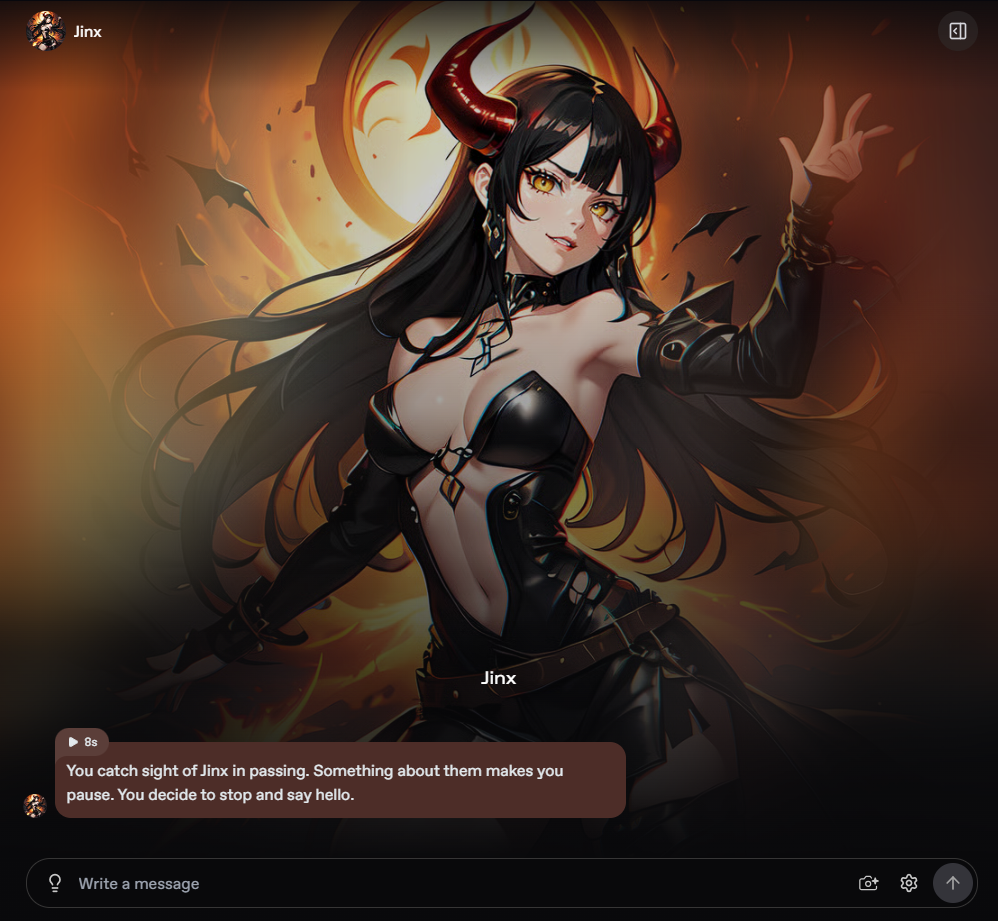
4. Create Your Own Companion
If ready-made characters don’t suit you, open the character creator. Nectar guides you through appearance settings before asking for more personal details.
This takes more decisions, but it’s also where the platform starts to feel different from a basic chatbot.
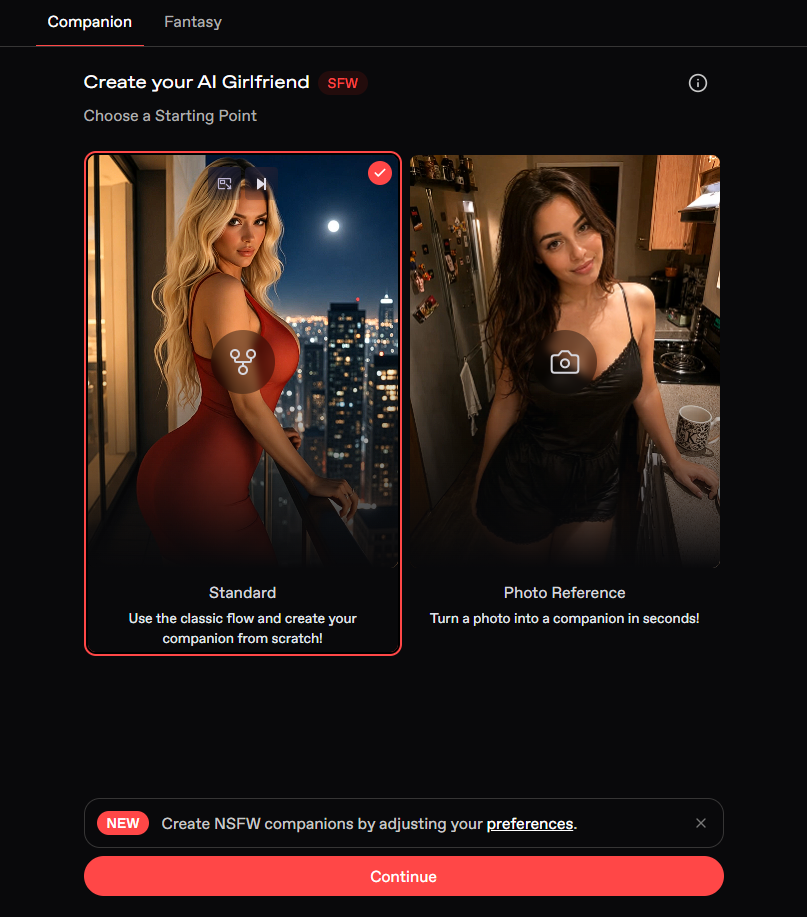
Our impression: Nectar makes the first steps easy to understand. The character editor requires more attention, especially because some appearance settings can’t be changed later. We’d start with a ready-made character before building our own.
Nectar Features: How Much Control Do You Really Get?
Nectar features cover much more than ordinary AI messaging. The platform combines character design, different chat models, memory controls, and media creation.
We think the best way to judge these tools is to look at what they let you do, not simply how many options appear on the screen.
Nectar Characters and Memory: More Than a Pretty Face
The character creator is one of the strongest parts of Nectar. You can choose a realistic or anime-style companion, set physical traits, and write a personality. The six-step creation process covers appearance and additional character details.
We like that personality goes beyond simple tags. Instead of selecting “funny” or “romantic,” you can describe how your companion behaves. A character might make jokes when nervous, avoid talking about their past, or speak formally until they trust someone. Those details can give a story more personality.
Nectar characters also support custom greetings and additional physical traits. You can keep a character private or submit it for public use. One limitation is worth mentioning. Hair, eye color, ethnicity, and body type are fixed after creation. You can edit some other details later, including age.
What about memory?
Nectar combines recent conversation context with saved memories. You can add important facts yourself or let the system save selected details automatically. The size of the conversation context depends on your plan:
| Plan | Context Window |
| Premium | 8K tokens |
| Pro | 16K tokens |
| Ultimate | 64K tokens |
A larger window helps the AI refer to more of the conversation, but it doesn’t guarantee perfect recall.
We especially like that users can review and edit saved memories. You can correct old information or mark up to ten memories as especially important. Still, Nectar doesn’t carry memories from one conversation into a completely new chat. If you start over, you’ll need to add important details again.
Nectar Chat: Six Models, Six Ways to Tell a Story
The ability to change AI models is one of Nectar’s most interesting tools. Instead of using the same system for every conversation, you can choose from six models with different writing styles.
| Model | Best Use |
| Nectar Basic | Casual, simple conversations |
| Orchid Lite | Story development |
| Fuchsia | Creative fictional scenes |
| DeepSeek V4 Flash | Action and dialogue |
| Primrose | Emotional, detailed conversations |
| Orchid | Natural character-based roleplay |
Some models may be in beta or unavailable to certain users.
For us, Orchid and Fuchsia look like the most interesting options for roleplay. Orchid focuses on character-driven conversations, while Fuchsia aims for more creative replies. But here’s the part we wouldn’t ignore: some models have a credit cost. That means changing models can affect how much you spend.
Nectar chat also includes tools for reply suggestions, regeneration, and writing style. These are useful when the AI gives a dull answer or doesn’t move the scene forward. The platform isn’t limited to one-on-one conversations either.
Its Fantasies feature lets you enter prepared scenarios, while group chats support up to ten companions. You can even choose which character should speak next. That could be great for a fantasy adventure or a story where several characters have different motives.
The main concern is consistency. Based on user feedback, Nectar can become repetitive after longer sessions, especially if a character’s setup is too vague. We’d give each character a clear role rather than expecting the AI to invent everything.
Nectar Images and Videos: Can You Control the Scene?
Nectar images are closely tied to the companions you create. You can request a picture directly from a chat or open the full image generator to choose more settings. The system supports realistic and anime styles, different models, and custom visual options.
One feature we like is the ability to select several companions for the same image. Supported V3 generations can include up to ten characters. That’s useful for people who want pictures from group stories.
The quality depends partly on how you write your request. Nectar prompts should include a clear subject, setting, action, and visual style. Here’s an example we’d use for a fictional scene:
An anime-style portrait of a young adult detective wearing a dark coat, standing beside an old train station at sunset, soft golden light, serious expression.
It’s simple, but it gives the generator enough direction. You can also select preset options for outfits, poses, faces, and effects. The Enhance tool can add detail to your request, although it uses credits.
And what about Nectar videos?
Video generation includes a V3 model with sound. You can create clips from five to thirty seconds and select resolutions up to 1080p. The generator also supports video extensions and scenes with several companions. Longer clips and better quality cost more credits.
Voice messages and calls are available too. You can listen to character replies or talk through a live voice session on supported plans. We think the media tools add real value, especially if you’re writing a visual story. But we’d keep the first requests short. Complicated videos can cost more, and AI-generated movement or speech may not always match your plans.
Nectar NSFW Content: Adult Roleplay and Its Limits
Nectar NSFW features allow adult users to create mature fictional conversations and images. You can switch between SFW and NSFW browsing options. This helps separate general character content from adult material.
The platform supports romantic roleplay and fictional relationships, but it still has content rules.
Requests involving minors, non-consensual intimate material, harmful acts, or misuse of real people’s identities are prohibited. The service uses automatic filters and human review to enforce these limits.
Users may sometimes find that a harmless prompt gets flagged. Nectar offers an appeal process for content that appears to have been blocked by mistake. We see this as an adult-friendly platform with boundaries, not a service that promises to accept every request.
Ease of Use: Does the Nectar App Work on Your Phone?
The Nectar app is really a mobile-friendly website rather than a native Android or iOS application, according to its current Help Center. You can open Nectar in your mobile browser or add it to your home screen as a PWA.
The main interface is organized around Discover, Chat, Create, Generate, and Community. It takes a little time to learn where everything sits, but the categories are clear. We like having the character tools and media generator in one place. Still, the interface can feel busy when you open advanced chat settings. On a phone, long character descriptions and detailed image prompts may be less comfortable to edit.
For simple conversations, the mobile version should be enough. For character creation, we’d choose a laptop or desktop browser.
Nectar Pricing: What Do You Actually Get for Your Money?
Nectar pricing has four levels: Free, Premium, Pro, and Ultimate. The company advertises low prices for annual subscriptions, but its public articles and checkout information aren’t always consistent.
The following figures are advertised monthly equivalents for annual billing, not confirmed month-to-month rates.
| Plan | Advertised Price | Main Benefits |
| Nectar Free | $0 | Basic chat, limited images, one companion |
| Premium | $4.99/month equivalent | More messages, images, basic memory tools |
| Pro | $9.99/month equivalent | HD generation, more memory, unlimited custom companions |
| Ultimate | $14.99/month equivalent | Highest limits, advanced memory, video and voice chat |
Published annual prices are approximately $59.99, $119.99, and $179.99. Check the actual checkout total before paying.
Is Nectar free worth trying?
Yes, for a first look. The advertised free offer includes around fifteen messages, ten daily image generations, and one custom companion. However, the exact reset rules and available features can change.
Nectar free access is better viewed as a demo than a replacement for a paid plan. The credit system also needs attention. Credits may be required for advanced chat models, paid memory options, voice tools, image upgrades, and video generation.
That can make a cheap subscription more expensive if you frequently use premium features.
Would we pay for Nectar?
For someone who mainly wants text roleplay, Premium seems like a reasonable starting point. Pro makes more sense if you enjoy creating several characters and generating images.
Ultimate is more suited to people who plan to use video and voice regularly.
Subscriptions renew automatically. You can cancel through your account settings or contact support. The service normally keeps paid access active until the end of your current billing period, but unused time isn’t automatically refunded.
We’d avoid committing to a full year before checking the monthly checkout options and credit limits.
Privacy Check: Is Nectar Safe?
Is Nectar safe for private conversations? The platform has published privacy rules, account controls, and security measures. Still, we wouldn’t treat AI conversations as completely private from the service itself.
Nectar AI, LLC states that it collects account details, usage information, messages, and user-generated content. Certain data may be shared with service providers or disclosed when required by law.
The privacy policy describes encryption and other protections, but it doesn’t promise that every conversation is end-to-end encrypted.
There is also an age-related detail worth knowing. The current Help Center presents Nectar as an 18+ platform, while the Terms of Use allow users under 18 to access SFW areas only. Adult features are strictly limited to people aged 18 or older.
You can request account deletion through the available account controls or support. Before doing so, we’d save any original character descriptions you want to keep.
Most importantly, avoid sharing private documents, addresses, passwords, or payment information in character chats.
Nectar Advantages and Disadvantages
Here’s what we’d put on our shortlist after looking through the platform’s tools and user feedback.
Nectar Reviews from Real Users: What Do People Like?
The real user feedback on Nectar is interesting because people don’t always agree about its strongest feature.
Some prefer the chat system. Others care more about character creation, while a few are frustrated with credits and restrictions.
In a January 2026 Reddit discussion, one user described several months with Nectar. They enjoyed quick roleplay sessions and the unexpected turns characters could take. However, the experience became repetitive over time.
The same user praised Orchid’s stability but disliked spending credits on actions such as generating another response. That’s a fair concern. A credit-based service can feel affordable until you start changing replies or trying several models in the same conversation.
Another Reddit thread about whether Nectar is worth trying shows mixed opinions about the interface, paywalls, and content restrictions.
Some users say Nectar works well for short stories. Others complain that too many features sit behind paid limits.
The positive feedback is worth noting, though. People often mention the range of character settings, creative conversations, and attractive visual designs.
We found three common patterns:
- Chat quality: Fun and creative for short scenes, but sometimes repetitive over time.
- Character creation: Plenty of control, although changing some details later can be difficult.
- Pricing: Reasonable entry plans, with added costs for people who use advanced tools often.
We didn’t find a reliable official Trustpilot score that we’d use for this review. The lack of a confirmed native Nectar app also means similarly named store listings shouldn’t be treated as official app reviews.
Is Nectar Legit, or Is Nectar a Scam?
Is Nectar legit? Yes. Nectar AI is an operating AI companion platform with published terms, pricing information, an established website, and support channels.
But is Nectar a scam? We haven’t found enough evidence to support that claim.
The more practical concern is whether the subscription gives you enough value for your preferred activities. If you expect unlimited premium models, free videos, and endless voice calls from a basic plan, you may be disappointed.
We’d check the account’s credit prices before making a purchase. That’s the best way to avoid surprises.
Our Final Verdict: Should You Give Nectar a Chance?
Our Nectar review ends with a rating of 8.6/10.
We think Nectar has a lot to offer adults who like building characters and writing their own fictional stories. The character editor, different AI models, and group scenarios make it more flexible than a basic companion chatbot.
The media tools are a nice extra, especially if you want pictures or videos connected to your stories. However, we’d be more cautious if you want perfect long-term memory or predictable costs for heavy media use.
For people who enjoy creative roleplay and don’t mind learning a few settings, Nectar is worth considering. Start with the free version, see whether the characters suit your style, and only then decide if Premium makes sense.
Nectar FAQ
Can I change my Nectar character’s voice after creating it?
Yes. You can adjust voice settings through the character editor or supported chat controls. However, the options depend on your current plan and the character’s setup. Custom voice previews may also use credits.
Does Nectar support languages other than English?
Yes. Nectar supports conversations in several languages, including Spanish and Chinese. You can ask your companion to speak another language, although the quality of replies may vary between models.
Can I make a private Nectar character public later?
Yes. You can change your character’s visibility through its settings. Public characters may go through review before appearing in Discover. Make sure the profile and any attached media follow Nectar’s content rules.
What happens if I accidentally delete a conversation?
Deleted conversations cannot be recovered. Nectar also offers Archive and Reset options, which work differently. Archive keeps the conversation and its memories, while Reset clears its saved memories. We’d use Archive when we simply want to put a story aside.
Can I use the same persona in different Nectar stories?
Yes. Personas let you define your own identity, background, and role. You can use one persona in several conversations or create different personas for different fictional worlds. The number available depends on your subscription.
Can I turn a picture into a video on Nectar?
Yes. Open a supported generated image and select the video option. You can choose from the available generation settings and describe how the scene should move. The final cost depends on the selected options.
What should I do if Nectar charges credits but doesn’t create my image?
First, check whether the result appeared in your gallery. If the request truly failed, contact support through Discord or [email protected]. Include the time, model, settings, and credit balance change. The support team can review the failed charge.